

LiveOps
Manage versions, sync addressables, and generate code from LiveOps dashboard templates.
Once Hammer SDK is set up in your Unity project, open the LiveOps tools from Unity → UDO → Hammer LiveOps. This interface lets you manage versions, sync addressables, and generate code based on templates from the dashboard.
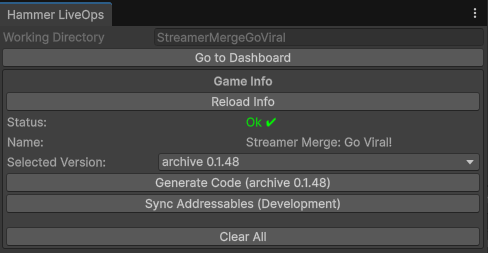
Controls
- Working Directory — where generated code files are stored. Change the path via Dashboard → LiveOps Settings → Code Generation.
- Go to Dashboard — opens the LiveOps dashboard in your default browser.
- Reload Info — refreshes local data. Use after making changes on the dashboard to fetch the latest configuration.
- Selected Version — pick the version to work with.
- Generate Code — pulls template files from the dashboard for the selected version and previews the files to be generated. Some files (e.g. conditions) may require manual updates; structural changes require overwrite + reimplementation.
- Sync Addressables (Development) — uploads all prefab-type addressables to the dashboard. Avoid using full asset paths as keys to prevent issues when assets are moved. Existing addressables are matched by key and cleaned before re-upload.
- Clear All — deletes all files in the working directory. Use with caution.
Sample code
Stores
// get shop module from api
ILiveOpsShopModule shopModule = LiveOpsApi.Instance.GetModule<ILiveOpsShopModule>();

// get all defined shops
List<LiveOpsShop> allShops = shopModule.GetShops();

// get a specific shop by id or name
LiveOpsShop defaultShop = shopModule.GetShopById(5);
LiveOpsShop defaultShop = shopModule.GetShopByName("Default");

// get only visible shop pages (some may be disabled or have a false condition)
List<LiveOpsShopPage> shopPages = shopModule.GetVisiblePages(defaultShop);
LiveOpsShopPage shopPage = shopPages[0];

// get only visible shop slots
List<LiveOpsShopSlot> shopSlots = shopModule.GetVisibleSlots(shopPage);
LiveOpsShopSlot shopSlot = shopSlots[0];

// get all rewards from a slot
List<LiveOpsItemWithAmount> rewards = shopModule.GetRewards(shopSlot);
Remote config
int defaultExchangeRate = 5; // fallback used if remote config can't be retrieved
int exchangeRate = Hammer.Instance.REMOTECONFIG_Get<int>("exchangeRateKey", defaultExchangeRate);
Custom property
// get property
Level levelProperty = LiveOpsApi.Instance.LiveOpsProfile.LiveOpsCustom.Get<Level>();

// set value — also fires OnPropertyChanged
levelProperty.Value = 10;

// get value
int level = levelProperty.Value;

// listen for property changes
LiveOpsApi.Instance.LiveOpsProfile.Custom.OnPropertyChanged += propertyId =>
{
    if (levelProperty.Id != propertyId) return;

    int changedLevel = levelProperty.Value;
    // do whatever you want here
};
Custom data
// first you need to get the related document store
ILiveOpsDocumentStore<LiveOpsShopItem> documentStore = LiveOpsApi.Instance.LiveOpsData.GetDocument<LiveOpsShopItem>();

// get all custom data as a list
List<LiveOpsShopItem> shopItems = documentStore.GetAll();

// get a specific custom data row by id
LiveOpsShopItem shopItem = documentStore.GetById(23);
Condition
LiveopsSessionCondition testCondition = Hammer.Instance.REMOTECONFIG_Get<LiveopsSessionCondition>(
    "testSessionConditionKey", new LiveopsSessionCondition());

// get condition module from api
ILiveopsConditionModule conditionModule = LiveOpsApi.Instance.GetModule<ILiveopsConditionModule>();

// evaluate against current profile
bool result = conditionModule.Evaluate(testCondition);